Disjoint Set Unions Can Solve Real World Problems
Problem Overview
Given a list of accounts where each account contains a name and a list of emails,
merge accounts that share at least one common email. Two accounts belong to the same person if they share any email.
Remember that just because two accounts have the same name, does not mean they belong to the same person.
Example:
Input: accounts = [
  ["John", "johnsmith@mail.com", "john_newyork@mail.com"],
  ["John", "johnsmith@mail.com", "john00@mail.com"],
  ["Mary", "mary@mail.com"],
  ["John", "johnnybravo@mail.com"]
]

Output: [
  ["John", "john00@mail.com", "john_newyork@mail.com", "johnsmith@mail.com"],
  ["Mary", "mary@mail.com"],
  ["John", "johnnybravo@mail.com"]
]
Here, the first two John accounts share johnsmith@mail.com, so they merge. The third John has no overlap, so stays separate.
The emails are returned in sorted order.
How can we achieve this efficiently?
Naive Approach
Repeated merging
- Start with the list of accounts.
- For every pair of accounts, check if they share any email.
- If they do, merge them into one account (combine all emails, keep the name).
- Repeat this process until no more merges are possible (a full pass finds no overlapping pairs).
- At the end, sort each account's emails and return.
This is inefficient since in the worst case you are comparing every account to every other account in O(n^2) time.
Each comparison checks whether two accounts share any email, which takes O(e) time.
So one full pass would be O(n^2 * e).
You would repeat this for O(n) passes until there are no merges in a single run.
In total this solution would run in O(n^3 * e) time.
Having to connect components should immediately tell you that this is a graph problem. If two emails appear in the same account, they're connected. We need to find all connected components and group emails accordingly.
Thankfully, we have a data structure that is great for grouping elements into disjoint sets and merging said sets efficiently.
Union Find Approach
- Grouping connected accounts
Each node will represent an index of an account in the accounts array.
We want to create disjoint sets where each set contains every account that belongs to one user.
We will map email -> index of the account it belongs to.
This map will allow us to determine whether an email exists in more than one account.
To build our disjoint sets we will search through all emails in each account:
- If the email exists in our map, then that email belongs to the current account and the account already in the map. Therefore we union both account indexes
- If it doesn't, then add it
n = len(accounts)
uf = UnionFind(n)

emailToAcc = {} # email -> associated account index
for i,a in enumerate(accounts):
    for e in a[1:]:
        if e in emailToAcc:
            uf.union(i,emailToAcc[e])
        else:
            emailToAcc[e] = i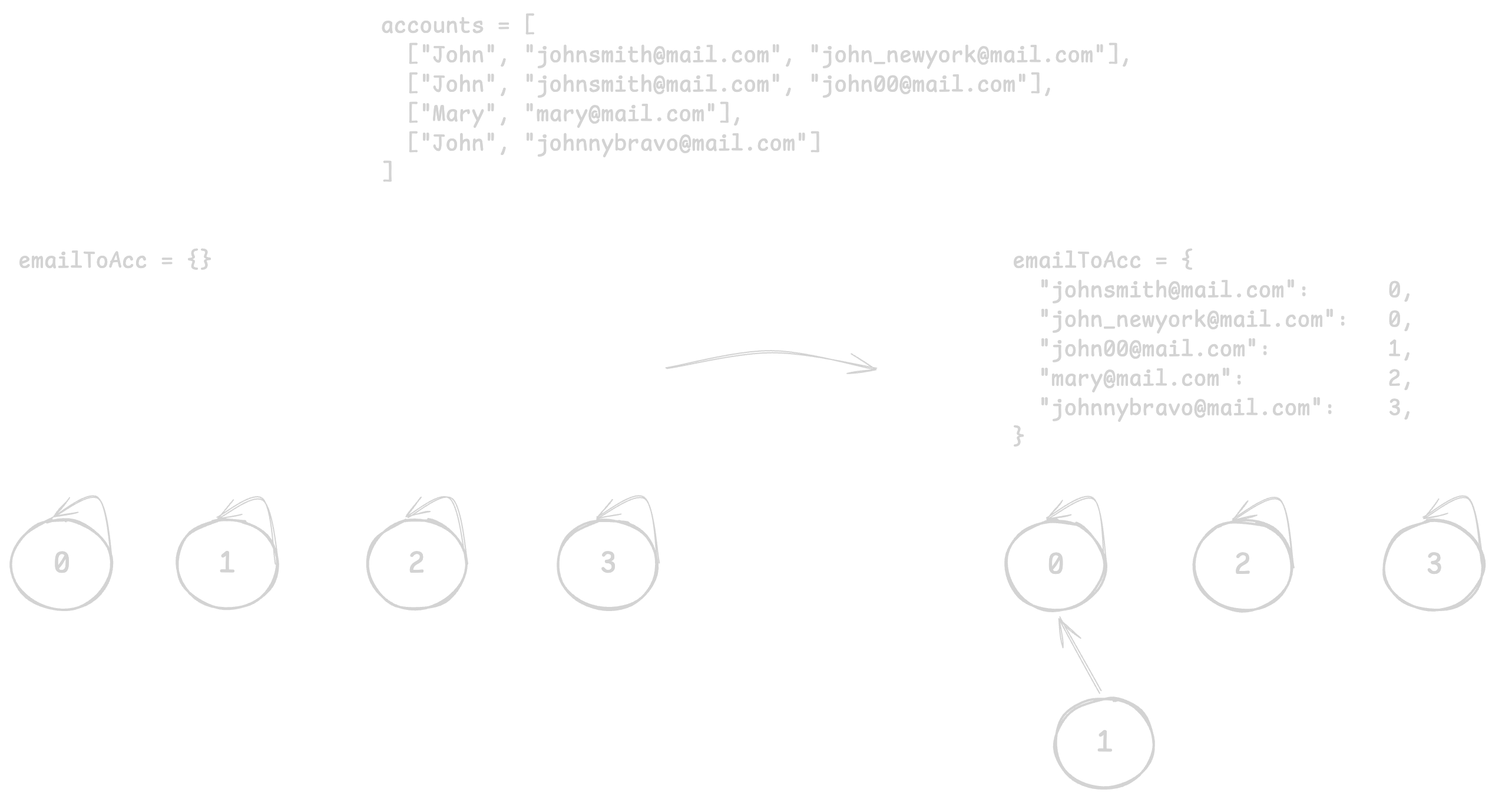
After processing all emails, each connected component in our Union-Find structure represents one user. e.g. nodes/accounts 0 and 1 are in the same component, meaning they belong to the same user.
2. Gathering accounts from sets
Now that we have all accounts separated by user in our tree, we will take each representative account (or root) and map it to all of its corresponding emails.
We will create a new mapping for this: root account index -> list of emails. Not all accounts may be in this map, since we only need the root account to represent all accounts under one user.
emailGroup = defaultdict(list)
for e,i in emailToAcc.items():
    root = uf.find(i)
emailGroup[root].append(e)- Loop through each email and account pairing in our previous
emailToAccmap. - Find the root of every email's account index.
- Take that index and append/group the email in
emailGroup.
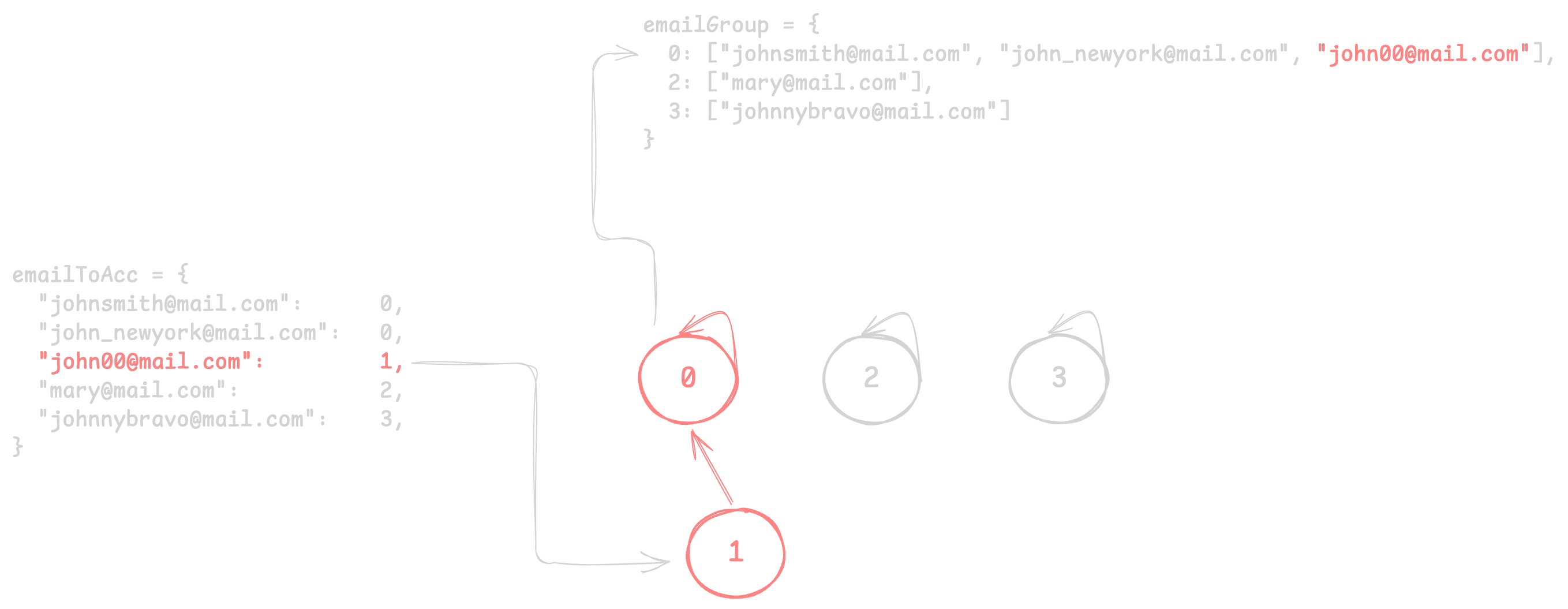
Now we have a clean mapping from a user account to all emails!
3. Create output
Now all we have to do is create our sorted output array.
    res = []
    for l,e in emailGroup.items():
        name = accounts[l][0]
        res.append([name] + sorted(emailGroup[l]))

    return res
Output
res: [
  ["John", "john00@mail.com", "john_newyork@mail.com", "johnsmith@mail.com"],
  ["Mary", "mary@mail.com"],
  ["John", "johnnybravo@mail.com"]
]
Why Union Find?
The elegance of Union Find here is that we don't need to explicitly build a graph.
Each union operation implicitly creates edges between emails.
As per usual with this algorithm, the find and union operations are optimized with path compression
and union by rank, giving us near O(1) lookups.
Solution
class UnionFind:
    def __init__(self, n):
        self.parents = [i for i in range(n+1)]
        self.rank = [1] * (n+1)

    def find(self, n):
        if self.parents[n] != n:
            self.parents[n] = self.find(self.parents[n])
        return self.parents[n]

    def union(self, n1,n2):
        r1, r2 = self.find(n1), self.find(n2)
        if r1 == r2:
            return False
        if self.rank[r1] > self.rank[r2]:
            self.parents[r2] = r1
        elif self.rank[r1] < self.rank[r2]:
            self.parents[r1] = r2
        else:
            self.parents[r1] = r2
            self.rank[r2] += 1
        return True

class Solution:
    def accountsMerge(self, accounts: list[list[str]]) -> list[list[str]]:
        n = len(accounts)
        uf = UnionFind(n)

        emailToAcc = {}
        for i,a in enumerate(accounts):
            for e in a[1:]:
                if e in emailToAcc:
                    uf.union(i,emailToAcc[e])
                else:
                    emailToAcc[e] = i

        emailGroup = defaultdict(list)
        for e,i in emailToAcc.items():
            root = uf.find(i)
            emailGroup[root].append(e)

        res = []
        for r,e in emailGroup.items():
            name = accounts[r][0]
            res.append([name] + sorted(emailGroup[r]))

        return res
Complexity Analysis
Time Complexity: O(NE * log(NE))
- N = number of accounts
- E = maximum emails per account
We iterate through all N·E emails once to build emailToAcc,
then once more to build emailGroup. The complexity to sort the result is then O(NE * log(NE)).
Space Complexity: O(NE)
Takeaway
The "accounts merge" pattern appears in many real-world scenarios: merging duplicate user profiles, clustering related data, and network connectivity problems.